
CS2 Aimbot Settings That Give You Control
A practical look at each aimbot option in CS2 and a sensible way to begin tuning them.
Most aimbot problems come from settings and not from the aimbot itself. If you understand each option you can fix most of them.
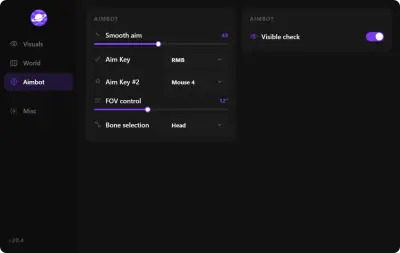
FOV
FOV is the area around your crosshair where the aimbot looks for targets. A small area means it only works on enemies close to where you are already aiming. A large area can grab a target you did not mean to shoot. Start small.
Smoothing
Smoothing controls how quickly your aim moves to the target. Low values are fast and abrupt. Higher values are slower and easier to follow. Many players settle on a middle value.
Hitbox selection
This is the body part the aimbot aims for. Head gives the most damage per shot but is harder on moving targets. Chest or body is more forgiving. You can choose based on the weapon you hold.
Aim key
Put the aimbot on a key you can press without moving your movement hand. A hold key is usually easier than a toggle because you decide exactly when it acts.
Team check
Turn this on. Aiming at a teammate in a hurry is a quick way to lose a round.
A starting recipe
Small FOV. Medium smoothing. Chest or head depending on your weapon. Hold key. Team check on. Play a few matches and change one setting at a time. Save the version you like.
Keep it in context
Aim settings are one part of the picture. Cheats carry risk and settings that work today may need changes after a patch. See the CS2 cheat page for the current feature list. Pair this with the triggerbot guide and legit versus rage styles.